

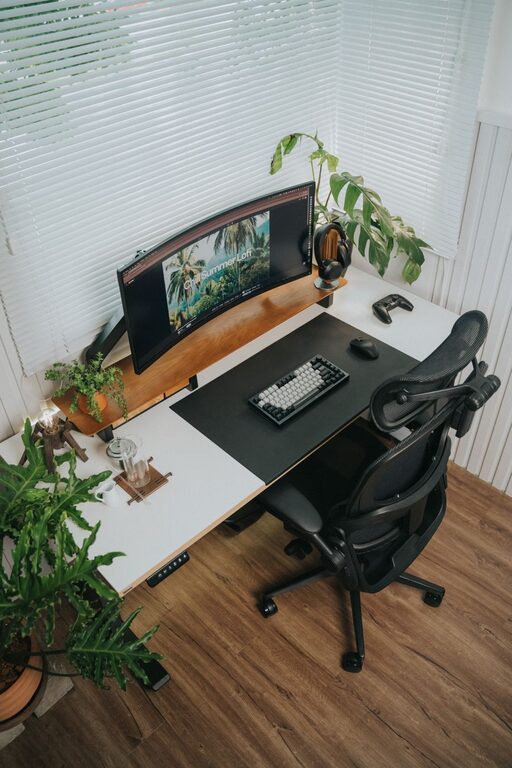
Creating an ideal desk setup can make a significant difference in your productivity and overall comfort. Whether you work from home, at an office, or study regularly, having a workspace designed to support your focus and reduce strain will help you perform better and feel good throughout the day. In this post, we’ll explore practical tips to organize and arrange your desk for maximum comfort and concentration.
Why a Good Desk Setup Matters
Before diving into the tips, it’s important to understand why the way you arrange your workspace affects your work quality. A cluttered or poorly designed desk can cause distractions and physical discomfort, leading to headaches, back pain, and reduced motivation. On the other hand, a well-thought-out setup can minimize these issues and create an inviting, organized space where your mind can stay on task.
Essential Elements for Focus and Comfort
1. Choose the Right Desk and Chair
Your desk and chair are the foundation of your setup.
– Desk height: Ideally, your desk should allow your forearms to rest comfortably parallel to the floor when typing.
– Chair support: Invest in an ergonomic chair that supports your lower back, encourages good posture, and offers adjustable features such as seat height and armrests.
– Movement: If possible, consider a sit-stand desk or a setup that allows changing positions throughout the day to reduce fatigue.
2. Position Your Monitor Properly
Where you place your monitor impacts both your posture and ability to concentrate.
– Screen height: The top of the screen should be at or slightly below eye level to prevent neck strain.
– Distance: Keep the screen about an arm’s length away to reduce eye fatigue.
– Multiple monitors: If you use more than one screen, place them at equal height and angle them slightly inward for smooth transitions.
3. Organize Your Desk Layout
A tidy, intentional layout keeps distractions at bay.
– Essential items only: Keep frequently used tools like pens, notebooks, and your phone within easy reach.
– Declutter: Remove non-essential items that can create visual noise.
– Use organizers: Drawer dividers, cable management clips, and desktop trays help maintain order.
4. Optimize Lighting
Proper lighting can reduce eye strain and keep you alert.
– Natural light: Position your desk near a window if possible, but avoid glare on your screen by using blinds or curtains.
– Task lighting: A desk lamp with adjustable brightness and color temperature allows you to customize lighting for reading or computer work.
– Avoid flickering: Use LED bulbs to reduce screen flicker and flicker-related headaches.
5. Incorporate Comfort Enhancers
Physical comfort supports mental focus.
– Foot support: Use a footrest if your feet don’t fully touch the ground.
– Wrist support: Consider ergonomic keyboards or wrist rests to ease typing strain.
– Temperature: Keep your workspace at a comfortable temperature; a fan or heater can make a difference.
Tips to Maintain Focus at Your Desk
1. Minimize Distractions
– Silence notifications: Turn off or limit phone and computer alerts during deep work periods.
– Use noise-canceling headphones: These can help block out background noise.
– Keep your phone out of sight: If possible, place it in a drawer or another room.
2. Personalize Thoughtfully
Adding personal touches can make your space inviting without creating clutter.
– Plants: Small indoor plants can improve air quality and reduce stress.
– Photos or artwork: Choose calming images that inspire rather than distract.
– Color accents: Use colors known to boost focus, such as blue or green.
3. Take Breaks and Move
Staying seated for long periods decreases focus and comfort.
– Follow the 20-20-20 rule: Every 20 minutes, look at something 20 feet away for 20 seconds to relax your eyes.
– Get up regularly: Stand, stretch, or walk briefly every hour to improve circulation and energy.
Setting Up Your Desk: A Step-by-Step Guide
- **Clear and clean your current workspace.** Start fresh by removing everything and wiping surfaces.
- **Arrange your desk and chair.** Adjust height settings to suit your body.
- **Set up your monitor(s).** Position screens with the correct height and distance.
- **Organize your essential tools.** Keep everyday items within arm’s reach.
- **Add lighting.** Use a combination of natural and task lighting.
- **Incorporate comfort items.** Footrests, wrist pads, and cushions go in next.
- **Personalize your space.** Add plants and tasteful decor.
- **Test your setup.** Work for a while and adjust as needed for comfort and focus.
Conclusion
Designing a desk setup aimed at increasing focus and comfort is all about understanding your needs and making intentional choices. By investing in ergonomic furniture, organizing your workspace efficiently, optimizing lighting, and minimizing distractions, you can create a workspace where productivity thrives. Remember, small adjustments often lead to big improvements in how you feel and work each day. Take the time to tailor your desk setup—it’s an investment in your well-being and success.